
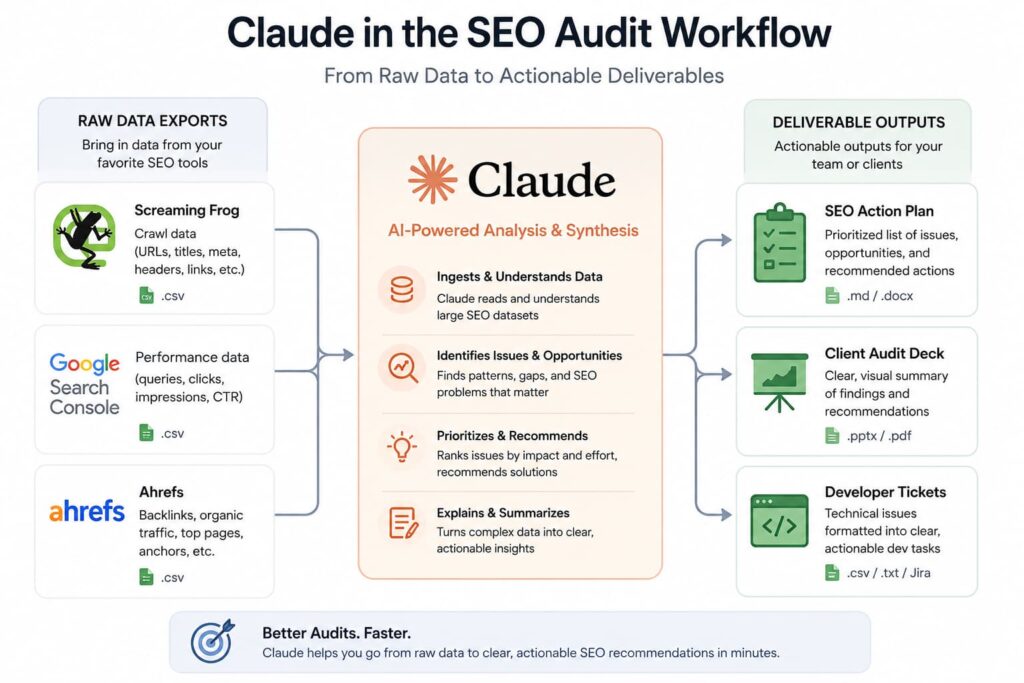
This guide covers how to use Claude as an active SEO audit partner: feeding it crawl data, log files, content samples, and competitor intelligence, then extracting structured analysis, prioritized recommendations, and client-ready outputs. It does not cover how to run a technical crawl -use Screaming Frog, Sitebulb, or Ahrefs Site Audit for that -and it does not replace GA4, GSC, or a dedicated log file analyzer like Botify. Claude works on the analysis and synthesis layer, not the data collection layer.
Who This Is For (And Who Should Stop Reading)
This guide is for SEO practitioners -in-house or agency -who already know what a crawl budget problem looks like, understand the difference between a 301 and a 302, and have at least one audit under their belt. You should already be comfortable exporting CSV data from Screaming Frog or pulling Search Console performance reports.
If you’re a business owner who has never done SEO before, stop here. This guide will give you a false sense of control over a process you don’t yet have the mental model to supervise. Hire an SEO first.
This is also not for practitioners who want to fully automate audits. Claude will make mistakes. It will miss context. It needs a human with domain knowledge to verify its output before anything goes into a client deck or action plan. If you want to remove yourself from the loop entirely, this is the wrong protocol.
The Core Protocol
Step 1: Define the Audit Scope Before You Open Claude
Every audit has a different center of gravity. An e-commerce site with 80,000 SKUs has a fundamentally different problem set than a 12-page SaaS marketing site. Before you type a single prompt, write down three things: the site’s primary revenue mechanism, the main organic traffic concern (decline, plateau, cannibalization, etc.), and the one deliverable the client actually needs.
Claude’s output quality degrades when you feed it everything at once without a frame. A defined scope keeps the model -and you -focused. The single biggest time-waster in AI-assisted audits is opening Claude before you’ve answered these three questions yourself. You get back what you bring in.
Step 2: Prepare and Segment Your Data Exports
Pull these exports before starting:
From Screaming Frog or Sitebulb: All URLs with status code, title tag, meta description, H1, word count, canonical tag, and indexability status. Also pull the duplicate content report, internal links report (source, destination, anchor text), and response codes filtered to 3xx, 4xx, and 5xx.
From Google Search Console: Performance data for the last 16 months grouped by page (impressions, clicks, CTR, average position), the Coverage report with particular attention to “Crawled -currently not indexed” and “Discovered -currently not indexed” buckets, and the Core Web Vitals report.
From Ahrefs, Semrush, or Moz: Organic keyword rankings with position history, the backlink profile filtered to top pages by linking domains, and a keyword cannibalization report if available.
Keep each export in a separate CSV. Do not merge them before feeding to Claude -you’ll lose the ability to cross-reference accurately, and that cross-referencing is where Claude generates its most useful output.
Step 3: Start With a System Prompt That Sets the Analyst Role
Open Claude and set context explicitly. Don’t paste a CSV and ask “what’s wrong with this site.” Open with something like:
*”You are an SEO analyst reviewing audit data for a B2B SaaS site with approximately 400 indexed pages. The primary concern is an organic traffic decline of around 35% over the last six months. I’ll feed you data exports in segments. For each one, identify the top three to five issues by estimated traffic impact, explain the likely cause, and suggest a fix with enough specificity to hand to a developer or copywriter.”*
That framing changes the output significantly. Claude stops summarizing and starts prioritizing.
Step 4: Feed Data in Segments, Not All at Once
Claude’s context window is large, but reasoning quality degrades when you push too much undifferentiated data through at once. Filtering to a few hundred rows at a time produces sharper analysis than pasting a raw 5,000-row export. Filter first inside Screaming Frog before you paste anything.
Paste your filtered response code export and ask: *”Identify any redirect chains longer than two hops, flag all 302s that should be 301s, and list any 404s receiving meaningful internal links.”*
Paste your title tag and H1 export and ask: *”Flag duplicate or near-duplicate title tags, identify missing title tags, and highlight any titles over 60 characters or under 30. Note any pages where the H1 and title tag diverge significantly in topic -not just wording.”*
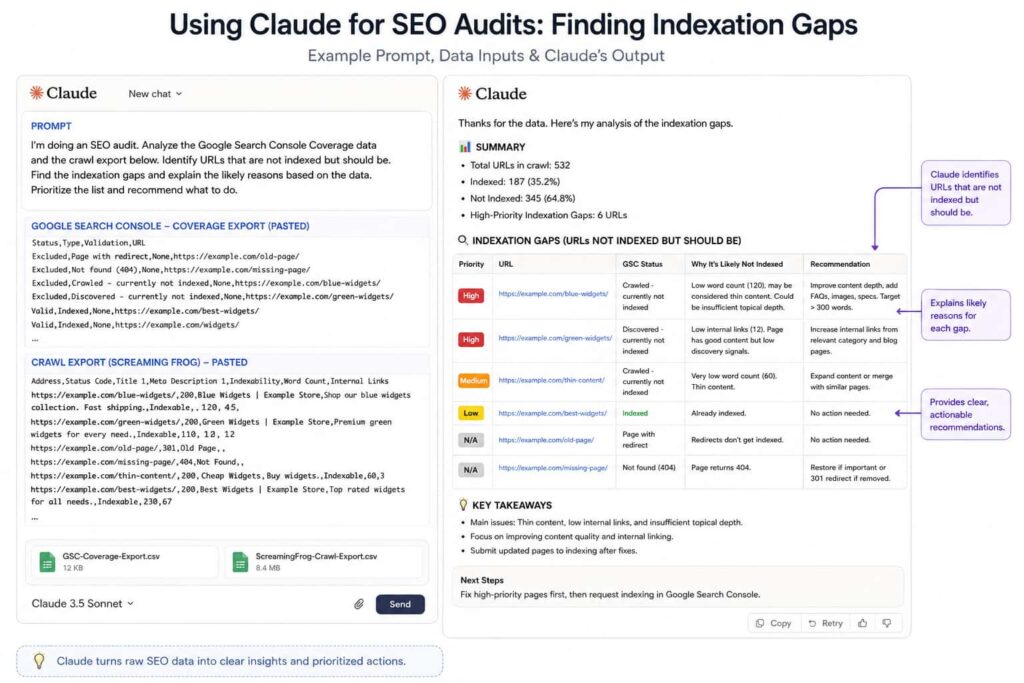
Paste your GSC coverage data and then follow with your crawl export, asking: *”Cross-reference these excluded URLs against the crawlable URLs in the crawl export I just pasted. Identify URLs that are indexable according to the crawl tool but excluded in GSC -that gap is where I want to focus.”*
That last prompt is one of the highest-leverage uses of Claude in a technical SEO audit. Manually cross-referencing crawl data and GSC coverage takes 45 minutes in a spreadsheet and produces three minutes of actual insight. Claude inverts that ratio and, more importantly, explains *why* a discrepancy might exist rather than just listing it.
Step 5: Run a Content Gap and Cannibalization Pass
Paste your keyword rankings report filtered to keywords with more than 50 impressions per month and ask Claude to group keywords by topic cluster, identify keywords where two or more pages rank in the top 30 positions simultaneously, and flag clusters where ranking positions fall between 11 and 20.
Positions 11 through 20 are where well-targeted consolidation or content refresh work moves the needle fastest -faster, in most cases, than trying to push a position-4 page to position 1. This is the zone worth prioritizing in recommendations, and it’s counterintuitive enough that clients consistently push back until you show them the CTR curve.
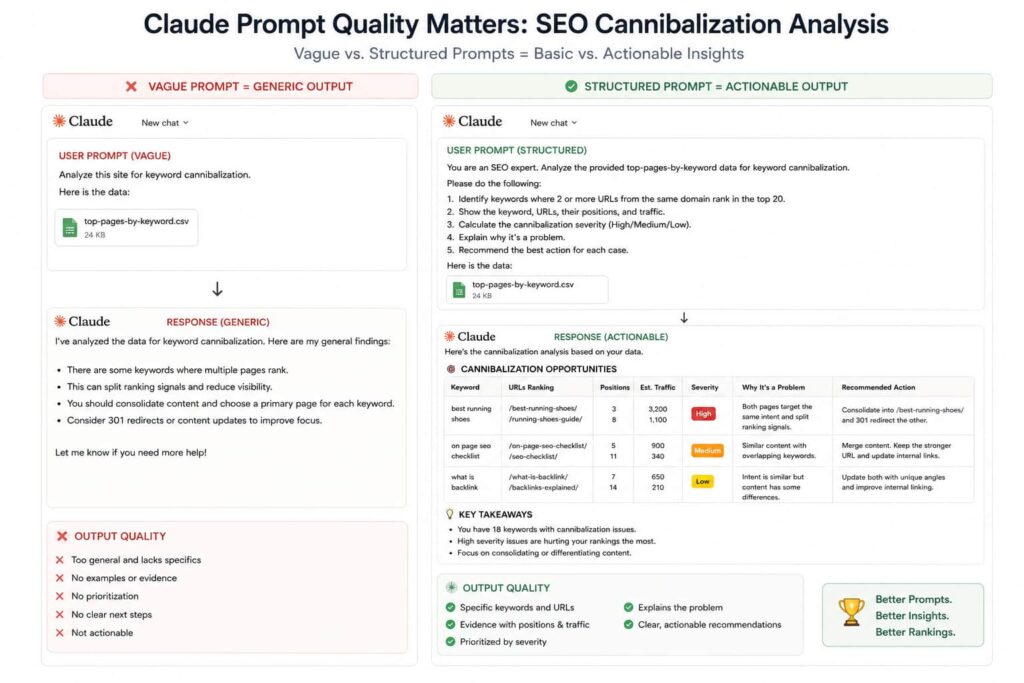
For cannibalization analysis, the most actionable prompt is: *”For each cluster where two pages rank within 20 positions of each other, recommend whether to consolidate (and which URL should be the canonical), differentiate (and how), or leave alone. Give a one-sentence reason for each call.”*
Step 6: Generate a Tiered Action Plan
After completing the data passes, prompt Claude to produce a prioritized action plan in three tiers:
Tier 1 -Quick wins: Changes completable in under two hours per item, high likelihood of measurable impact within 30 to 60 days. Typical examples include fixing 404s with strong internal links, correcting templated meta descriptions across a page type, and resolving redirect chains to direct 301s.
Tier 2 -Core projects: Larger efforts taking one to two weeks, medium-term impact. Redirects audits, content consolidation, internal linking rebuilds, and structured data implementation typically land here.
Tier 3 -Strategic initiatives: Architecture changes, content programs, Core Web Vitals overhauls -impact measured in quarters, not weeks.
Ask for each item to include the specific page or URL set affected, the recommended action in one sentence, the developer or writer action required, and an estimated difficulty rating of Low, Medium, or High. This structure maps directly to how clients think about budget allocation and resource scheduling.
Contraindications: When NOT to Use This Protocol
Do not use Claude as your primary audit tool if the site has an active manual action in GSC. Manual actions require human judgment grounded in detailed link analysis and content review -the kind of contextual reading Claude can assist with but cannot lead. Manual action reconsideration work needs a practitioner who has been through that process before.
Do not feed Claude personally identifiable information. If your log files, CRM exports, or analytics data contain user emails, session IDs, or any other PII, strip that data before it touches Claude or any external AI tool.
Do not treat Claude’s cannibalization or content recommendations as final without checking current SERP context. Claude’s training has a knowledge cutoff. It does not know what the top-ranking pages for a given query look like today. Always verify recommendations against a live SERP before acting.
How This Is Typically Done Wrong
Dumping the full crawl CSV with no filter or framing produces one of two outcomes: generic observations about duplicate content and missing meta descriptions that any checklist tool would surface, or a model that starts confabulating patterns because it’s processing too much noise. Filter to problem areas first. Screaming Frog already has the filters built in.
Asking Claude to “audit the site” with just a URL and no data means you’re getting a surface-level content review of whatever is publicly visible at that moment -not an audit. The actual technical SEO problems (crawl traps, internal link equity leaks, indexation gaps) are invisible to that approach. Claude cannot see your server logs, your GSC coverage report, or your historical ranking data from a URL alone.
Accepting prioritization without validating estimated impact is the mistake that creates client problems. Claude ranks issues as high, medium, or low based on the data you provide and general SEO principles -it does not have access to your client’s conversion rate, their content publishing velocity, or the competitive difficulty of the keywords tied to problem pages. A 404 on a page receiving 40 clicks per month is a Tier 1 fix on a 200-page site and a deprioritized non-issue on a 50,000-page e-commerce domain. Sanity-check every impact estimate against actual traffic before it goes into a deliverable.
Edge Cases That Require Deviation
Hreflang and international SEO audits: Claude can analyze hreflang attribute syntax errors if you paste the tag markup directly, but validation logic for large multiregional sites with 20 or more country variants is complex enough that you should run the data through a dedicated validator like Hreflang.com or Sitebulb’s hreflang checker before acting on Claude’s analysis. Use Claude to explain why a cluster is broken; use the validator to confirm the full scope.
JavaScript-heavy frameworks (React, Next.js, Angular): If Googlebot’s rendered crawl differs significantly from the raw HTML crawl, Claude’s analysis of your export may not reflect what Google actually sees. Run a Screaming Frog crawl with JavaScript rendering enabled, compare it against a non-rendered crawl, feed Claude both exports, and explicitly ask it to identify pages where the rendered and non-rendered versions diverge meaningfully in content or link structure.
Programmatic SEO at scale: When a site has 50,000-plus programmatically generated pages and the audit concern is indexation coverage, Claude’s value shifts from page-level to template-level analysis. Don’t paste individual URLs -paste a representative sample of 20 to 30 page types and ask Claude to identify which templates carry the structural signals that predict indexation success: unique data, sufficient body content above 300 words, and strong internal linking context from authoritative hub pages.
When to Escalate to a Professional
If a GSC performance report shows organic click volume dropping more than 40% in any 28-day window that doesn’t align with a known Google algorithm update, manual specialist review is required. Cross-reference the drop date against Google Search Central’s confirmed update history and tools like Semrush Sensor or MozCast. If you cannot trace the drop to a specific technical or content cause, bring in a specialist before taking corrective action -misdiagnosing a core update recovery as a technical fix is expensive.
If more than 15% of indexed URLs are returning soft 404 signals -pages with 200 status codes but no meaningful content -the site has a systemic architecture problem. That is a structural engagement, not an audit deliverable.
If the site has been through three or more domain migrations in the past four years with compounding redirect chains spanning multiple generations of URL structures, manual historical reconstruction is necessary before any redirect consolidation work begins. Claude can help document and map what you discover through that process -it is not positioned to discover it independently.
Key References and Standards
This protocol is grounded in Google’s Search Essentials (formerly Webmaster Guidelines), the Search Central documentation on crawling and indexing, and the E-E-A-T quality rater guidelines -the full QRG PDF is publicly available from Google and updated periodically. Every content quality call made during an SEO audit using Claude should be cross-checked against the current QRG language. It remains the closest public approximation of Google’s quality evaluation rubric.
On the tooling side, Screaming Frog’s crawl configuration documentation, Ahrefs’ cannibalization analysis guides, and John Mueller’s public commentary on GSC coverage report interpretation (available in the Google Search Central YouTube archive and Reddit AMA threads) provide the practitioner context behind the technical decisions this protocol makes.
For Claude specifically: prompt structure drives output quality. A vague prompt produces a vague analysis. The prompts in this guide are not optional phrasing suggestions -they are precision instruments. Adjust them for your site type, but preserve the specificity.
A Real Example of What This Surfaces
When I audited a mid-size e-commerce client selling outdoor gear -roughly 4,200 indexed pages -I pasted their Screaming Frog title tag export into Claude and asked it to flag structural patterns in the data. It immediately identified that 340 product pages were pulling an identical meta description from a category-level template, something that had slipped past three previous manual reviews because no one had looked at the data in aggregate. I cross-referenced those URLs in Search Console and confirmed they were averaging 60% lower CTR than comparable product pages with unique descriptions. That single finding gave me a concrete business case to prioritize the fix with the dev team, and it took Claude about 40 seconds to surface it from a CSV I’d had sitting in a folder for two weeks.
That’s the actual value here -not replacing the audit, but eliminating the parts that are slow and catching the things that are easy to miss at scale. The judgment about what to do with the finding still has to be yours.

One Response